BetaIFC quality control for Windows

To BIM or not to BIM? With Modellwarte, that is no longer the question.

Check every IFC model before it leaves your office: model health, IDS requirements, clashes, and what changed since the last issue. It runs on your computer, and the model stays there. Drop an IFC file on the start screen and get a report in a minute, with no project and no setup. When you need more, build pipelines that check every new export the same way, and keep every run on record.

The questions that remain

Whether to work in BIM is settled. What a BIM manager still has to answer, model after model, is whether this issue is fit to send. Modellwarte answers each of these in one run.

Is the model sound?

Health check of the IFC file itself: one project, unique and valid GlobalIds, a complete spatial hierarchy, names, materials, units, schema and classification. Findings show their weight: IfcWall 20 of 1,000 (2%), not just a list.

HC-001 … HC-012

Does it meet the client's requirements?

Validate the model against the client's IDS file, the buildingSMART format for information requirements. Each failed requirement points to the elements behind it.

IDSbuildingSMART

Does anything collide?

Clash detection between disciplines, with clash sets you define. Each clash gets a viewpoint and goes out as BCF to the authoring team. Runs in pipelines today; a quick-check tile is coming.

Clash setsBCF

What changed since the last issue?

Compare two revisions of a model: new and removed elements, changed attributes and properties, elements moved beyond a tolerance. Review only what is new.

RV-001 … RV-011

Can we show that we checked?

Every run is stored with its date, the rule package version and the file's fingerprint. Months later you can still say which model was checked, how, and with what result. Every report opens with the same header: office, project, cover, who checked, which model and which application exported it, status and time.

Run historysha256

Same model, same rules, same result.

Checks are deterministic, and rule packages are signed and versioned. When a client questions a finding, you can point to the exact rule set it came from.

Signed rule packages

The application, as it is

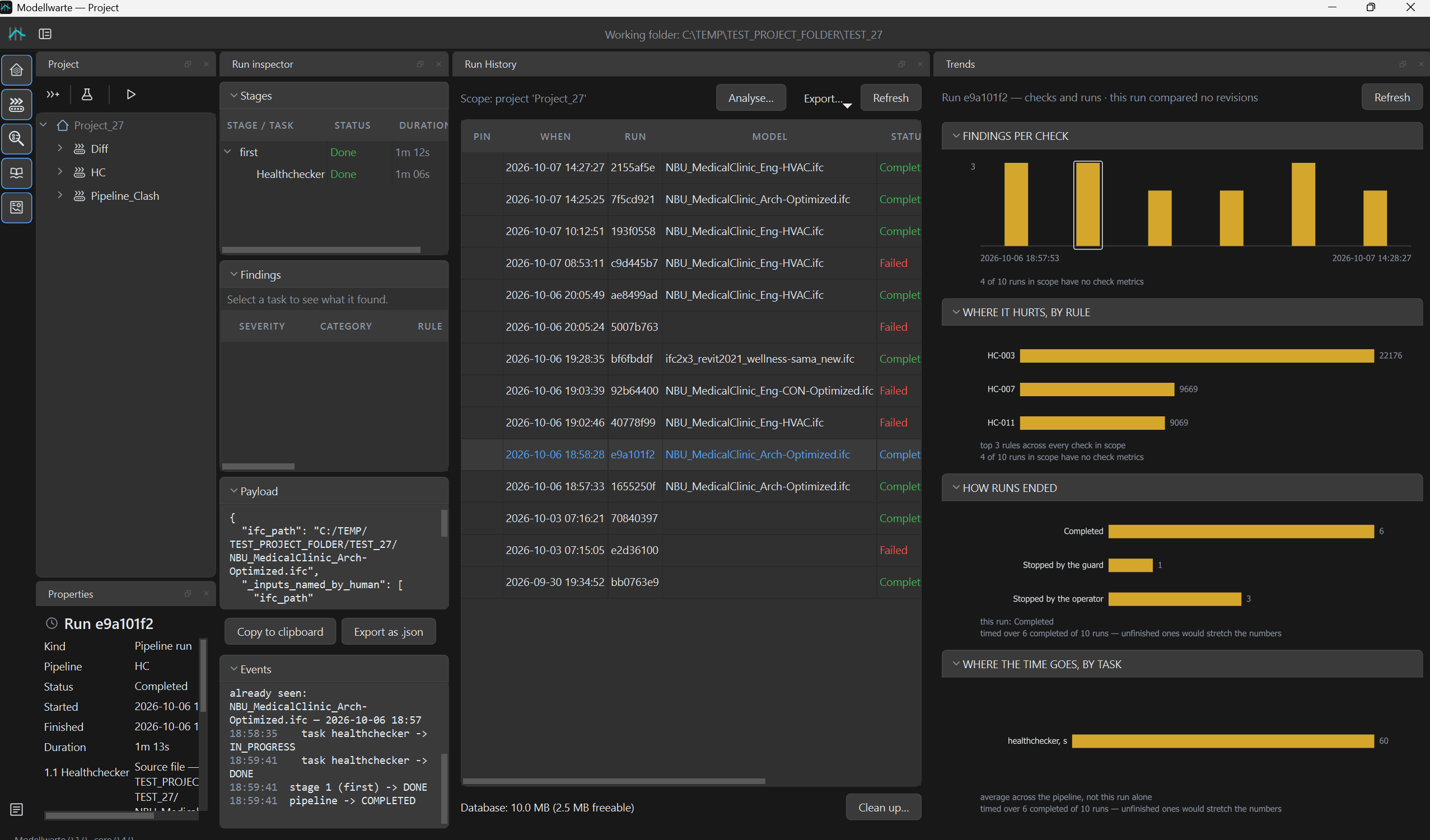
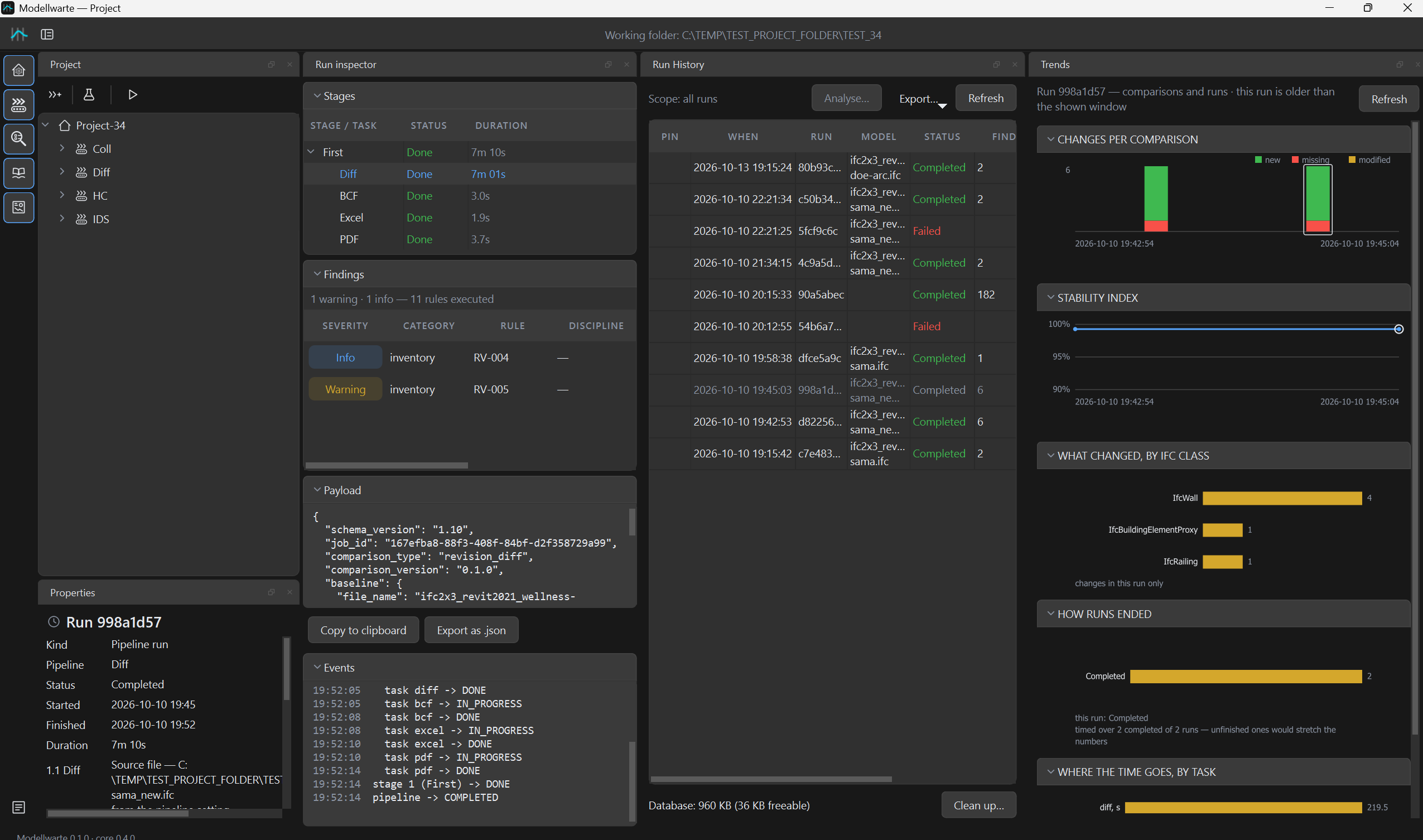
A Windows desktop application for BIM managers. Projects on the left, results with element snapshots in the middle, trends from run to run.

Run results with stages and findingsscreenshots/results.png
Run results. Stages, findings and the full record of a run.
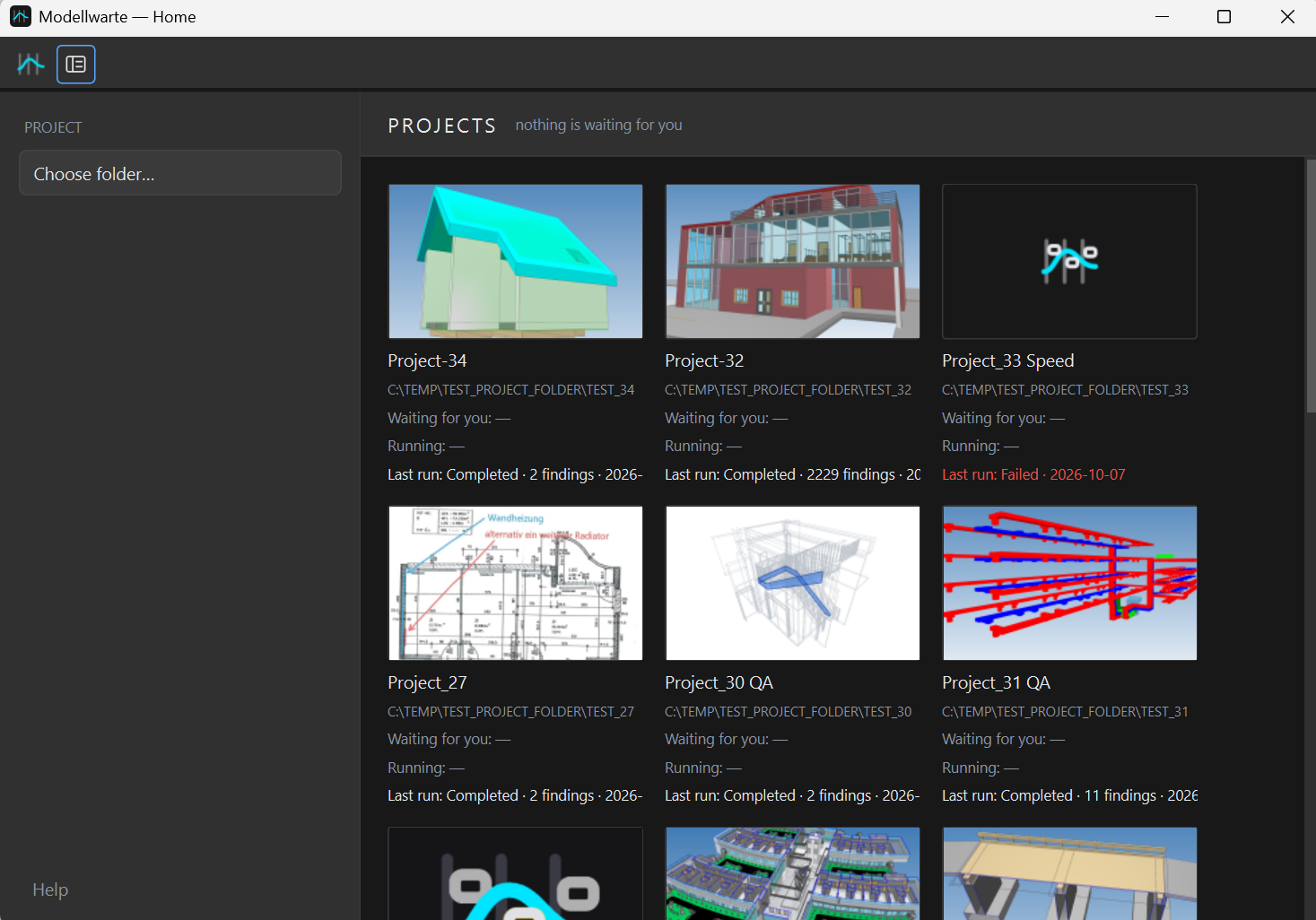
Start window with project tilesscreenshots/start.png
Start screen. Quick checks on top, one folder per project below, ready to archive or hand over.
Trends chart of findings per runscreenshots/trends.png
Trends. Findings per check, run after run.
Privacy

Your model never leaves your machine.

Many projects come with an NDA, and some are public-sector work. Modellwarte is a desktop application, so nothing gets uploaded and no server needs to be set up. We test this: a full check runs with network access blocked.

Your history stays yours: run history readable without our software. It is an SQLite database with versioned JSON run records, and any SQLite tool opens it. If you stop using Modellwarte, your archive stays with you.

What goes where

  • IFC geometry and model dataRead and checked locally. Never sent anywhere.
  • Reports, BCF files and run historySaved in your project folder, on your disk.
  • Quick-check reportsSaved in Documents\Modellwarte\Quick checks on your computer. If Documents is synced by OneDrive, so are they.
  • SupportIf something fails, you send us the run log. It contains no geometry and no license keys.
  • License checkDuring the beta the licence file ships with the program and is checked on your computer. No model data is involved.
  • Rule thresholdsShip with the program as a signed, versioned file. New versions come with a new program version. Nothing downloads on its own.
  • n8n summary (in development)Optional and off by default. Only run counts, only to a server you choose.
In development

Checks by the rules. Notes by AI.

We are building an optional connection to your own n8n server. Modellwarte does the counting on your computer. Your n8n workflow turns the numbers into a cover note for the client and can post it to your team chat. The check itself never depends on it.

Your computer1

Count what changed

After a run, Modellwarte compares it with the previous successful run and builds a short summary of numbers.

{
 "diff": {
   "added": 45 },
 "clashes": {
   "new": 4,
   "resolved": 18 }
}
Your computer2

Send to your webhook

Only this summary goes to the webhook you configure. No geometry and no IFC file. Modellwarte waits up to 30 seconds for a reply.

Your n8n3

Write the note

Your workflow sends the summary to the language model you choose and returns the text. It can also post it to Telegram or Teams.

Your computer4

Keep it with the run

The note is saved as ai_summary.md in the run folder, next to the reports.

Off by defaultNothing is sent until you add a webhook address. You decide which server receives the summary.
The check does not wait on AIIf the network, n8n or the model fails, the run finishes as usual with its numbers and without the note.
Same results as beforeFindings, reports and run history are produced exactly as without the connection. The AI only writes text about them.

From folder to report, without an IT project

Unzip it, drop an IFC file and read the report. For the office standard, point it at a project folder. There is no installer, no server and no database to administer. A BIM manager can set it up the same day.

1

Quick check

Drag an IFC onto Health check, Compare or IDS check on the start screen. The report opens when it is done.

2

Open a project

Choose a local project folder, name the office and add a cover picture. Build a pipeline from health check, IDS, clash and revision comparison steps and save it as your office standard.

3

Run and confirm

The pipeline can pause at a step and wait for someone to sign it off. That sign-off goes into the record.

4

Send the results

Send a run report to the client and BCF topics to the authoring team. Track the trend from run to run.

ExportsPDFExcelHTMLMarkdownJSONBCF
Platform
Windows desktop, 64-bit · beta 0.1.1
IFC schemas
IFC2x3, IFC4, IFC4.3
Requirements
IDS files
Issues out
BCF, with viewpoints
Report language
English
Infrastructure
None. No server, no cloud upload

Questions

If yours is missing, ask it in the beta request or simply reply to the beta email.

Which software do the models need to come from?

Any software that exports IFC. Modellwarte is tested on models from Revit, Vectorworks, SketchUp, Bonsai, Scia, DDS-CAD, TopSolid and others, in IFC2x3, IFC4 and IFC4.3.

Do we need a server or an IT department?

No. Modellwarte is a Windows application that works with a local project folder. The project folder should be on a local drive. Models can come from a network share.

Windows says "Windows protected your PC". Is that safe?

The beta is not yet signed with a Microsoft reputation, so Windows warns about every new program like it. Click More info, then Run anyway (German Windows: Weitere Informationen, then Trotzdem ausführen). To make sure the file is ours, compare its SHA256 with the one in your beta email: in PowerShell, Get-FileHash Modellwarte-*.zip.

Who can join the beta?

BIM managers, BIM coordinators, architects and engineers who check IFC models in their daily work. The beta is a free test: its purpose is to improve Modellwarte on real models and with real feedback.

What does the beta cost?

Nothing. Beta users get the full version free for the beta period of three to four months. Feedback is welcome by email, or in a short call if you like.

What happens after the beta?

The beta is there to improve the software and to learn whether it helps in practice. What comes next depends on that, and every participant hears about it before the beta ends. Your reports and run history stay on your disk either way.

What happens to our data if we stop?

It stays with you. Reports are ordinary files. Run records use a documented, versioned format that can be read without Modellwarte.

Are reports available in German?

Reports are in English for now. If you need another language for your clients, tell us in the beta request. It helps us decide what comes next.
Beta programme

Run it on your own models.

  • The full version, free for three to four months
  • Direct contact with the developer
  • Your feedback shapes what comes next
Prefer email? Write to us directly:
bim@modellwarte.com